一.论文总览
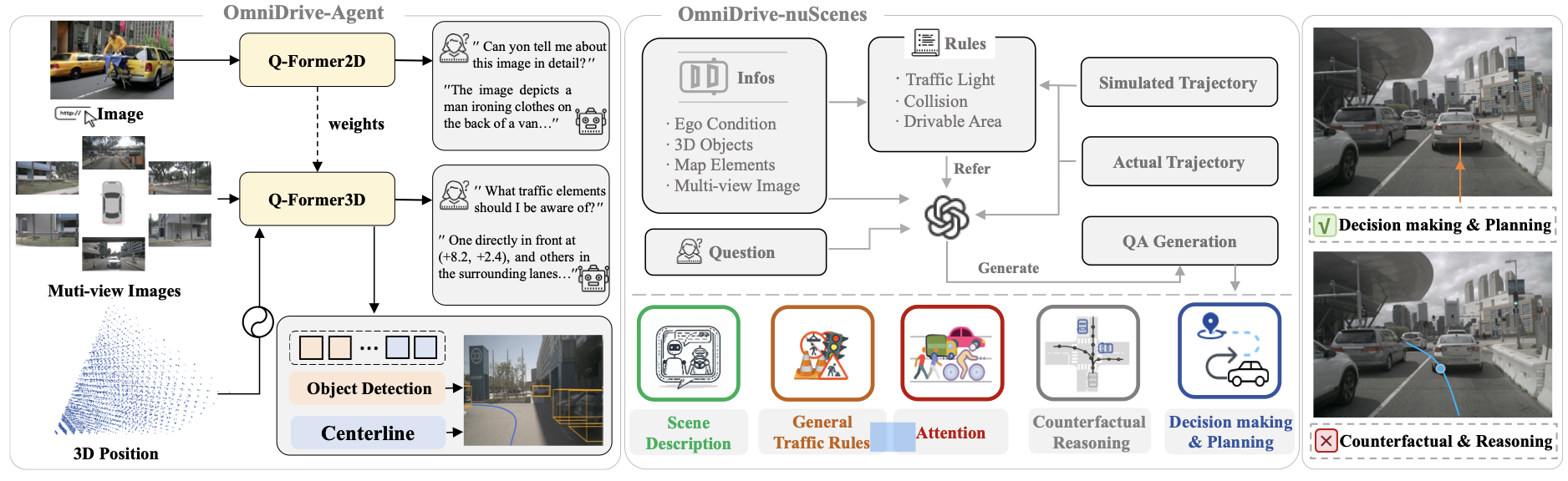
问题背景:
- 现有的将多模态大模型(Multimodal Large Language Model, MLLM)引入自动驾驶领域的方法中,大多不具备3D场景理解能力,但这一能力对于自动驾驶场景而言是不可或缺的,以一个驾驶场景中常见的问题为例:“询问当前车道是否可以左转”,该问题看似在做一个简单的语义判断,本质上需要涉及到对车道与自车的几何关系判断、车道与交通灯语义、地面标识语义的匹配,要回答这些问题,需要 MLLM 模型将 2D 理解和推理能力扩展到复杂的 3D场景中。
- 现有 MLLM 模型按照对图像的处理方式的不同,可以分为两种流派:一种是以 Flamingo 、BLIP-2、Qwen等方法为代表,以交叉注意力机制为基础,特点是不论图像分辨率都处理成统一长度的 token 序列,而另一种是以 Vit、 BLIP、LLAVA 为代表,以自注意力机制为基础,每个 token 用于代表固定像素大小的图像局部信息,这意味着不同的分辨率图像对应变长的 token 序列。对于自动驾驶场景而言,多视角、高分辨率、连续帧(视频)是感知任务的数据特点,而变长序列代表时延、不稳定。所以作者以 BLIP-2 结构为基础,引入 Stream-PETR(作者之前的工作),构建用于自动驾驶场景的 3D MLLM。
- 过去的 Benchmark 大多采用简单的 QA 的形式进行评测,已有工作证明端到端自动驾驶目前 open-loop 评测方式的局限性。另外,这种评测方式驱动的方法也无法完全利用到大语言模型强大的涌现能力。对于自动驾驶场景,类似于世界模型的反事实推断能力是更符合人类思考方式和习惯的。作者希望仿照 LLAVA 的做法,提出一种高效的数据构建方式,用于构建大规模 VQA 数据集,一方面用于 MLLM 的 Instruction-tuning 训练,另一方面用于评测。
贡献:
- 一种具有3d 能力的vision-language model结构,将多模态大语言模型用于自动驾驶场景中的3d场景任务;
- 一种基于 GPT-4o 的数据构建方法,用于生成自动驾驶场景的 VQA 问答数据,包括反事实推断形式的问答。
二.方法
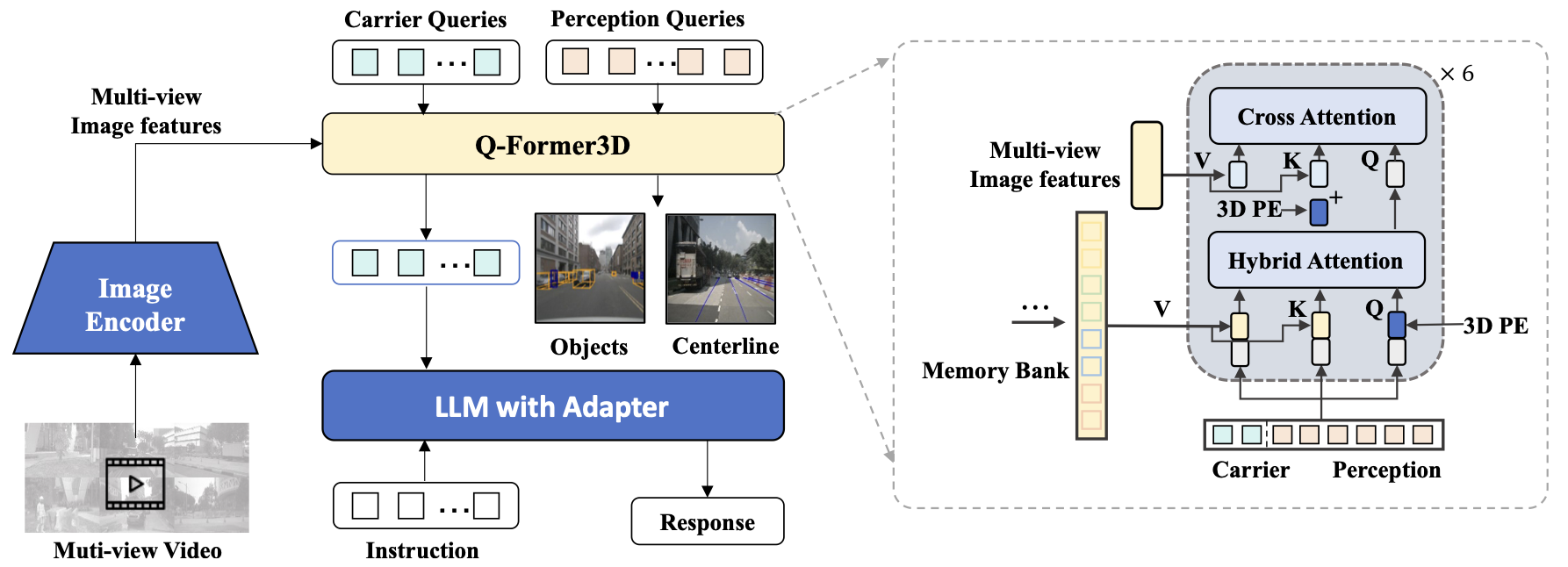
结构总览:
- 图像编码器:作者采用的是基于 Clip 结构的 Eva-02 模型作为图像编码器,通过多视角图像特征提取 3d 信息,这一部分没太多需要讲的。
- Q-Former3D:参考 BLIP-2 中的 Q-Former 结构,这里作者敏锐地发现了 Q-Former 结构和 Petr 系列模型结构的相似之处,将结构引入的同时也引入了 3D 目标检测任务作为辅助监督。
- LLM:之前的结构的作用在于提取 3D 信息特征,最终需要对齐到 LLM 模型能够理解的特征空间,进行 VQA 问答。
Q-Former3D:
作为最能体现作者贡献的模块,这一部分选择 Stream-PETR 出于以下考虑:PETR 所代表的稀疏 BEV 建模方式,适用于检测任务,相比于需要构建 dense bev feature 的方法来说,需要更小的计算量,同时加快模型的推理速度,毕竟OmniDrive 的核心在于多模态大模型的能力,检测任务仅作为辅助监督,所以尽量简化降低存在感。
Q-Former3D 整体结构基于 Stream-PETR,包括 Memery Bank时序融合模块,但这不是本文介绍的重点,先挖一个坑,会尽快在另外一篇博客中更新介绍 PETR 系列。
这里重点介绍作者额外的设计:
-
根据任务设计两种 query:用于3D 目标检测任务的 query 称为 Perception query,用于 LLM 生成文本任务的称为 Carrier query。
- $$ \begin{array}{r} (Q, K, V)=\left(\left[Q_c, Q_d\right],\left[Q_c, Q_d\right],\left[Q_c, Q_d\right]\right), \\ \tilde{Q}=\operatorname{Multi-head} \operatorname{Attention}(Q, K, V) \end{array} $$$$ \begin{array}{r} (Q, K, V)=\left(\left[Q_c, Q_d\right], P_m+F_m, F_m\right), \\ \tilde{Q}=\operatorname{Multi-head\operatorname {Attention}(Q,K,V)} \end{array} $$
-
上述过程经过多层后得到输出,按照输入的划分,Perception query 对应的输出会进入到 PETR head 进行前景目标检测任务;Carrier query 对应的输出会经过 MLP 映射成 LLM 的输入维度,然后送入 LLM 进行文本生成,这一做法和 LLAVA 相同。从结果来看,Carrier query 的主要作用就是用于视觉语言特征的对齐,同时利用到 3d 几何先验信息和 Perception query 中的感知检测结果信息。
训练策略
训练整体分为两个阶段:
-
2d 预训练阶段:
这一部分实际上是一个完整的 LLM 训练过程,也需要分为两个部分:
-
预训练:这个阶段不涉及到perception query的训练,所以剩余的部分和一个普通的MLLM的训练方式一样,这里由于模型结构是Q-Former形式的,所以采用BLIP-V2的训练方式,但是由于没有BLIP中的多个decoder结构,所以只能使用文本建模loss进行监督,没有使用BLIP中的其他的对比损失和匹配损失。这里主要就是完成了Q-Former的训练,实现了从图像特征到文本特征的对齐。
-
Instruction-tuning阶段:使用的也是LLAVA-V1.5 生成的数据集。
-
-
3d fine-tune 阶段:
这一阶段的目标是增强模型的3D场景理解能力,同时尽可能多地保留其原有的2D语义理解能力。
总体使用Lora 微调,以较小的学习率对视觉编码器和大型语言模型进行微调,并以相对较大的学习率训练Q-Former3D。
以上就是对整体方法框架的解读,可以看出的是:模型整体的3d 能力核心实际是在于 Q-Former3D 模块,另外复现发现方法整体对于学习率的设置比较敏感,并且在检测任务明显未达到收敛时,LLM 的planning任务的损失已有明显的收敛倾向,作者在 issue 中有提到,检测任务的收敛需要 24 个 epoch 左右,而最终作者提供的训练配置只有 6 个 epoch,猜测这一现象是与 Q-Former3D 的微调阶段的大学习率设置有关。
三. 结果
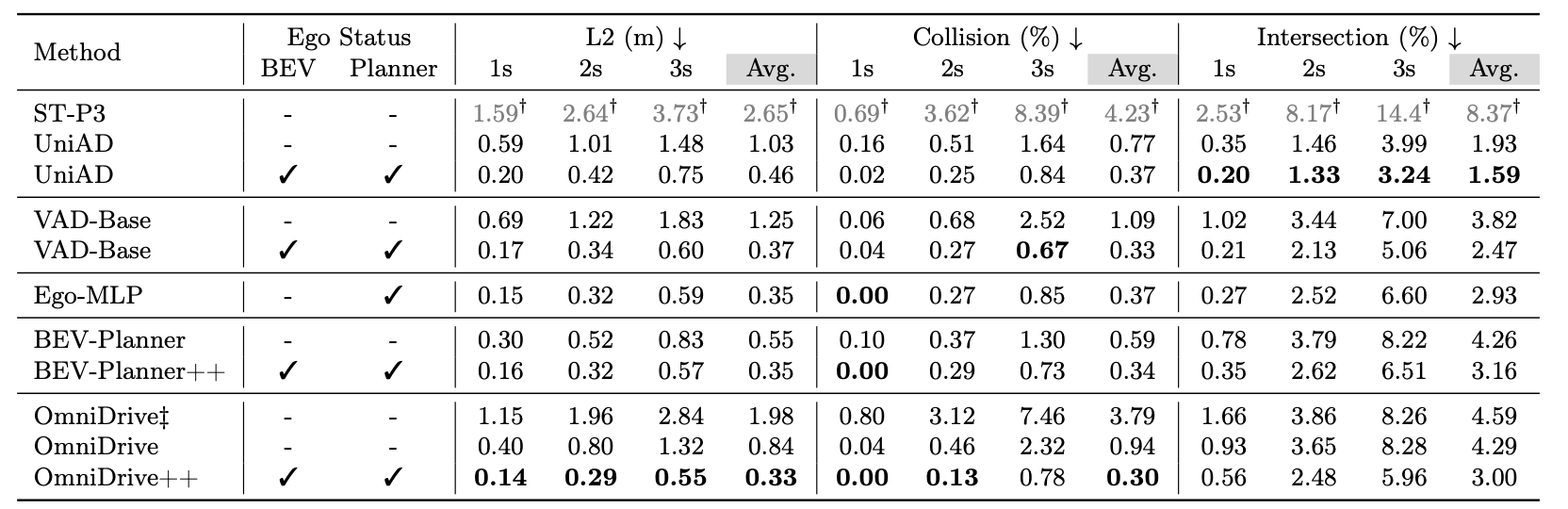
由于作者主要的卖点在于端到端自动驾驶在3d 场景的效果和反事实推断能力,所以作者并没有列出目标检测的指标,主要的卖点还是以 planning 为导向的端到端场景,所以对比的主要指标是 open-loop planning 轨迹的 l2 误差、object碰撞率、以及boundary 碰撞率
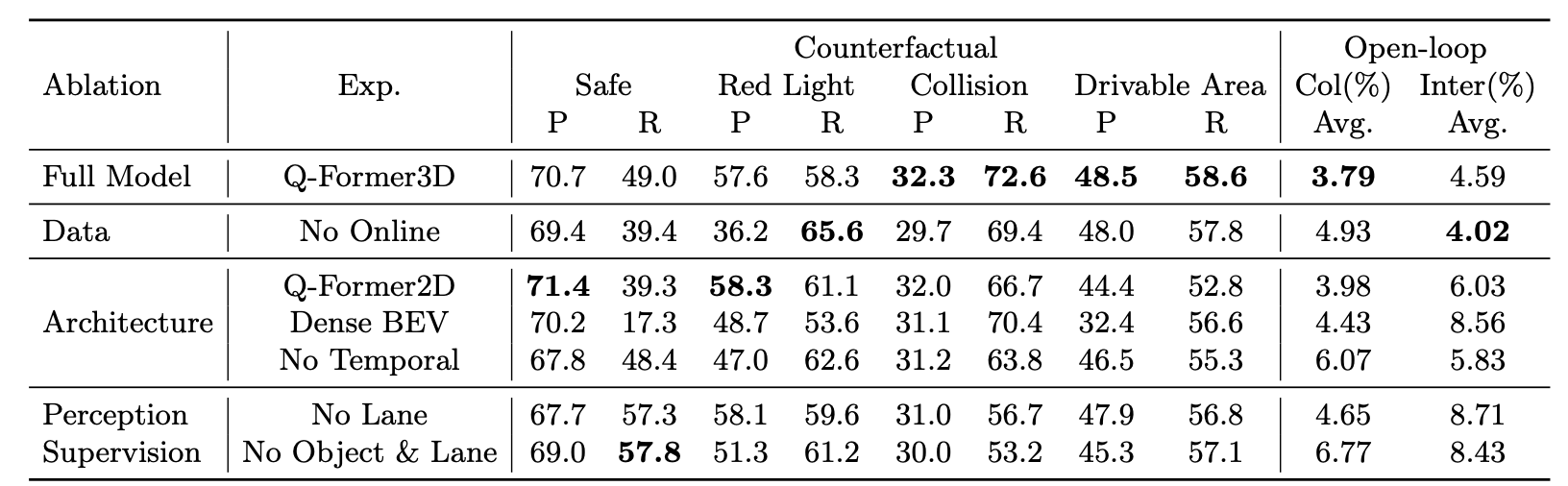
另外,关于作者提出的 benchmark,作者也进行了详细的消融实验来证明各类型数据的作用:
四.数据生成逻辑解读
该工作的另一大贡献是基于 GPT-4o 的数据生成方法,虽然总体上与 LLAVA 的做法相似,但作者对于自动驾驶场景中的任务做了一些别出心裁的设计,这一部分会详细解读作者是如何处理 Nuscenes 数据集信息,提供给 GPT 作为 prompt,用于生成包含反事实推断的对话。
首先,作者提供的示例图中,将提供的 prompt 分为以下几种信息:
-
Image:来自 nuscenes 数据集中的 6 个摄像头画面,按照前视和后视划分连接。需要注意的是,image prompt 在 VQA 生成时是没有使用的,这一做法猜测可能是防止 GPT-4o 的幻觉,也可能仅仅是延续 LLAVA 中的做法。
- Caption:对驾驶场景的文本描述,实际上这一部分也是先由 GPT生成的,后续作为生成其他内容的 prompt。
- Lane-object association:利用 nuscenes 数据集中的检测信息和 lane 几何信息做匹配,将匹配的结果以目录的形式提供给 GPT,便于 GPT 对整个驾驶场景中各 lane 构建整体感知。
- Simulated decision and trajectory:作者基于深度优先搜索算法,将 nuscenes 数据集中提供的 lane 中心线进行连接,形成轨迹,经过逻辑过滤后,用于让 GPT 生成反事实推断相关的问答。
- Expert decision and trajectory:相对于上一个,这里的"Expert"意义为 nuscenes 中的真值轨迹信息,代表安全的驾驶轨迹,用于让 GPT 理解驾驶意图和几何坐标信息(作者这里的坐标是 2d ego坐标系,第一维正值代表前向,第二维正值代表左向)。
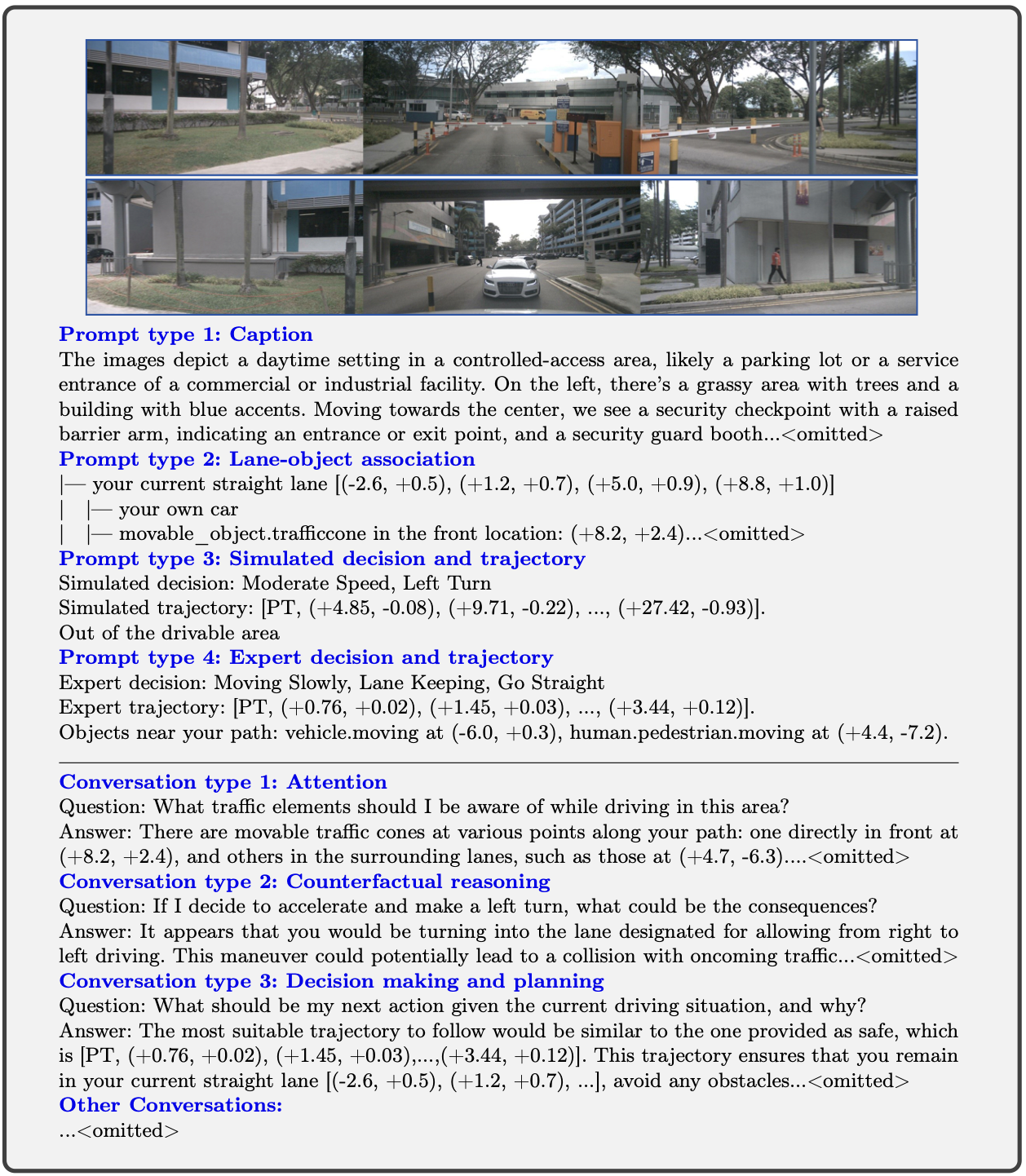
代码解读
总览:
- 用到的数据生成脚本分为三个:
desc.py:对应上图中 caption 的生成- conversation.py
- planning_vision.py
- 问题答案对生成逻辑,对应
transform_3d.py文件中两个函数:- preprocess_vqa:对应上图中 Conversation 的内容
- online_vqa
1. desc.py:
任务描述: prompt中提供环视图像和当前车辆的行车状态、驾驶行为描述(专家轨迹),需要gpt完成两个任务:
- 在一段话中总结驾驶场景。
- -在此任务中,应该提供驾驶场景的详细描述,例如指定道路状况。
- -注意任何特定设置(停车场、十字路口、环形交叉口)、交通要素(行人、车辆、交通标志/灯)、一天中的时间和天气。
- 分析当前驾驶行为。
- -任务是使用给定的图像简要解释驾驶意图,假设你在真实场景中驾驶。
- -您应该了解提供的图像,首先确定正确的驾驶决策/意图,推理出驾驶员在这种情况下应该特别注意的事项,并以要点形式列出。
代码解读:
    parser = argparse.ArgumentParser(description="Process NuScenes data.")
    parser.add_argument('--base_path', type=str, default='data/nuscenes/', help='Base path to the NuScenes data.')
    parser.add_argument('--lane_info_path', type=str, default='data/nuscenes/data_dict_sample.pkl', help='Path to the lane info pickle file.')
    parser.add_argument('--info_file', type=str, default='data/nuscenes/nuscenes2d_ego_temporal_infos_train.pkl', help='Path to the info file (e.g., nuscenes2d_ego_temporal_infos_train.pkl).')
    parser.add_argument('--output_dir', type=str, default='./desc/train/', help='Directory to save the output JSON files.')
    parser.add_argument('--n_process', type=int, default=8, help='Number of processes to use.')
    parser.add_argument('--api_key', type=str, required=True, help='API key for OpenAI.')
这里的base_path是nuscenes数据集的存放目录
lane_info_path、info_file都是作者提供的文件,其中:
- lane_info_path存放的是openlane_v2数据集中,各个传感器的路径、内外参、gt中各个lane、traffic_element以及它们之间的拓扑结构信息。
- info_file存放的是nuscense数据中各个scene中有效目标的相关信息, 包括lidar数据和cam数据的存放路径、gt的bbox以及类别信息等等
接下来按info_file中的数据,分成各个task:
tasks = [(d, lane_infos, traj_gen, output_dir, api_key, sys_prompt) for d in data]

# Call track_parallel_progress
mmengine.track_parallel_progress(
    func=preprocess_single,
    tasks=tasks,
    nproc=n_process,
    keep_order=True,  # Results will be in the order tasks were given
)
处理逻辑:
- 首先从info_file找到对应的lane_info索引信息,然后从lane_info中拿到
- 中心线的points位置信息,数据格式[n_lane, 11, 3],猜测是每条lane都由11个关键点坐标来表示
- gt_planning\gt_planning_mask(这里的维度是[n, 3], 前两维是坐标,后一维是yaw角)
- gt_fut_traj\gt_fut_traj_mask(是每一个周围其他目标的预测轨迹,可以和gt对应上)
if 'lane_info' in data.keys():
    lane_info = lane_infos[data['lane_info']]
    lane_pts = [lane['points'] for lane in lane_info['annotation']['lane_centerline']]
    traj, mask = data['gt_planning'][0], data['gt_planning_mask'][0]
    gt_fut_traj, gt_fut_traj_mask = data['gt_fut_traj'], data['gt_fut_traj_mask']
    planning_trajs, full_paths = traj_gen.generate_traj(lane_pts)
    expert_info = describe_expertv2(traj, mask, lane_pts, full_paths, gt_fut_traj, gt_fut_traj_mask, data['gt_fullnames'], data['gt_boxes'], data['gt_attrs'])
-
接下来调用generate_traj函数生成轨迹:
-
利用已有的中心线point坐标,使用dfs算法和一些过滤逻辑生成所有可行的path以及path上具体的关键点2维坐标信息
-
在self.planning_anchor中预定义了300个轨迹,每次生成轨迹时会从这里面随机挑选三个出来加入到备选轨迹中
-
备选轨迹的生成是先对传入的all_path_pts拟合一个曲线,这里的设置是用10个点来拟合,所以得到的controj_points是[10, 2],时间t设置的是[6, 1]、然后计算yaw角[6, 1]、轨迹坐标plan_traj[6, 2],reshape为[1, 12],最终的轨迹表示 格式为[1, 12 + 6 + 6]=[1, 24]
-
和之前随机加入的轨迹一起,随机打乱后挑选出前5个作为结果返回
-
def generate_traj(self, lane_pts, max_traj=5):
        num_anchors = self.planning_anchor.shape[0]
        random_list = [random.randint(0, num_anchors-1) for _ in range(3)]

        all_paths_pts, full_paths = self.search_path(lane_pts)
        plan_trajs = []

        for i in random_list:
            plan_trajs.append(self.planning_anchor[i].reshape(1, -1))

        for path in all_paths_pts:
            t = self.generate_t(self.step)
            t = np.cumsum(t)
            controj_points = fit_bezier_Endpointfixed(path, 10)
            plan_yaw = bezier_tangent_angles(controj_points, t).reshape(-1, len(t))
            plan_traj = control_points_to_lane_points(controj_points, t).numpy().reshape(-1, 2*len(t))
            plan_trajs.append(np.concatenate([plan_traj, np.ones_like(plan_yaw), plan_yaw], -1))

        random.shuffle(plan_trajs)
        plan_trajs = plan_trajs[:max_traj]
        return plan_trajs, full_paths
- 调用describe_expertv2函数,为了得到当前状态的描述信息:
def describe_expertv2(gt_planning, planning_mask, lane_pts, full_paths, pred_traj, pred_traj_mask, names, bboxes, attrs):
    #nuscenes数据集中的gt轨迹,前两维为坐标,最后一维是yaw角
    planning_traj = gt_planning[..., :2]
    planning_yaw = gt_planning[..., 2]
    mask = planning_mask.any(axis=1)

    combined_data = list(zip(names, bboxes, attrs, pred_traj, pred_traj_mask))
    #初级过滤,根据bbox的坐标,横坐标或者纵坐标大于50(距离太远)的目标直接去掉
    filtered_data = [(name, bbox, attr, traj, traj_mask) for name, bbox, attr, traj, traj_mask in combined_data if abs(bbox[0]) <= 50 and abs(bbox[1]) <= 50]
    all_names = []
    all_dists = []
    all_xy = []
    for name, bbox, attr, traj, traj_mask in filtered_data:
        if attr == '':
            full_name = name
        else:
            attr = attr.split('.')[1]
            full_name = name + f'.{attr}'
        #累加轨迹值,表示该物体的相对坐标
        traj = np.cumsum(traj, axis=1)
        #和该bbox位置相加后可以得到绝对坐标值
        traj += bbox[:2]
        masked_planning = gt_planning[mask]
        masked_traj = traj[traj_mask.astype(bool)][:6]
        #计算该目标离自车的距离
        dist_rec = np.linalg.norm(bbox[:2])

        if masked_planning.size == 0 or masked_traj.size == 0:
            l2_norm = dist_rec
        else:
            min_len = min(len(masked_planning), len(masked_traj))

            l2_norm = np.linalg.norm(masked_planning[:min_len][..., :2] - masked_traj[:min_len], axis=1).min()
        #计算该目标的轨迹与自车轨迹的最小距离,用于判断两个轨迹是否相关
        dist = min(dist_rec, l2_norm)
        #如果小于10,就加入到备选项中
        if dist <= 10.0:
            all_names.append(full_name)
            all_dists.append(dist)
            all_xy.append(bbox[:2])

    #得到速度,用于判断速度状态: Stopped/Crawling/Moving slowly/Moderate speed/Moving fastly
    #利用真值轨迹,判断车道变换行为: Left Lane Changing/Right Lane Changing/Lane Keeping
    #根据yaw角,判断行车行为: Go Straight/Left U-turn/Right U-turn/Left Turn/Right Turn
    ego_vel = calculate_speed(planning_traj, mask)
    speed_state = judge_speed_changes(ego_vel[..., 0])
    self_action = f"Expert decision: {speed_state}"
    lane_change = detect_lane_change(gt_planning[mask], lane_pts, full_paths)
    turning_behavior = determine_turning_behavior(planning_yaw)
    if speed_state not in ["Stopped", "Unknown"]:
        if turning_behavior == "Go Straight":
            self_action = self_action + ", " + lane_change
        if not (lane_change != "Lane Keeping" and turning_behavior == "Go Straight"):
            self_action = self_action + ", " + turning_behavior

    formatted_points = ', '.join(f"({format_number(point[0], 2)}, {format_number(point[1], 2)})" for point in planning_traj[mask])
    self_traj = f"Expert trajectory: [PT, {formatted_points}]."
    ego_state = [self_action]

    #description大概率会由当前速度状态 + 变道倾向/转弯倾向 构成
    description = '\n'.join(ego_state)

    return description
-
接下来处理prompt:
-
将前后各三张图片拿到后进行concat + resize操作,从[4800, 900] 到 [1536, 512]
-
然后将数据格式处理成Base64,用于HTTP传输
-
        front_image_paths = [data['cams']['CAM_FRONT_LEFT']['data_path'], data['cams']['CAM_FRONT']['data_path'], data['cams']['CAM_FRONT_RIGHT']['data_path']]
        back_image_paths = [data['cams']['CAM_BACK_LEFT']['data_path'], data['cams']['CAM_BACK']['data_path'], data['cams']['CAM_BACK_RIGHT']['data_path']]
        front_image, back_image = create_combined_image(front_image_paths, back_image_paths)

        front_image = front_image.resize((1536, 512))
        back_image = back_image.resize((1536, 512))

        encoded_front_image = encode_image(front_image)
        encoded_back_image = encode_image(back_image)

        while True:
            try:
                hat_completion = client.chat.completions.create(
                        model="gpt-4o",
                        messages=[
                            ****
                        ],
                        temperature=0.7,
                        top_p=0.7,
                        max_tokens=2000,
                    )
                result = json.loads(replace_newlines_in_json_string(hat_completion.choices[0].message.content))
                print(result)
                with open(output_file_path, 'w') as f:
                    json.dump(result, f, indent=4)
            except Exception as e:
                print(e)
            else:
                break
2. conversation.py:
任务描述:利用上一步中生成的描述信息,生成对应的对话问答内容,但这里还没有涉及反事实推断的生成,只是一些比较简单宽泛的问答。
代码解读:
这里不再需要传入lane有关的信息,而是需要拿到上一步脚本中生成的desc文本。
parser = argparse.ArgumentParser(description="Process NuScenes data.")
parser.add_argument('--info_file', type=str, default='data/nuscenes/nuscenes2d_ego_temporal_infos_train.pkl', help='Path to the info file (e.g., nuscenes2d_ego_temporal_infos_train.pkl).')
parser.add_argument('--desc_path', type=str, default='./desc/train/', help='Path to the description files directory.')
parser.add_argument('--output_dir', type=str, default='./conv/train/', help='Directory to save the output JSON files.')
parser.add_argument('--n_process', type=int, default=8, help='Number of processes to use.')
parser.add_argument('--api_key', type=str, required=True, help='API key for OpenAI.')

args = parser.parse_args()
main(args.info_file, args.desc_path, args.output_dir, args.n_process, args.api_key)
接下来就直接利用已有信息来生成prompt:
- 首先传入的是desc文本中的description和action两个text;
- 然后是两个拼接后的前后图像;
- 任务:
- 分析和解释当前的驾驶行为和相关的驾驶场景,设计一个你和一个人之间的对话,询问这个驾驶场景。提出不同的问题并给出相应的答案。不要问任何不能确定回答的问题。
- 还包括与图像中的内容相关的复杂问题,例如,询问场景中对象的背景知识,要求讨论场景中发生的事件。在回答复杂问题时提供详细的答案。例如,给出详细的例子或推理步骤,使内容更具说服力和组织性。
    output_file_path = osp.join(output_dir, data['token'] + ".json")
    os.makedirs(osp.dirname(output_file_path), exist_ok=True)
    if not osp.isfile(osp.join(output_dir, data['token']+'.json')):
        with open(osp.join(desc_path, data['token'] + ".json"), 'r') as f:
            scene_keywords = json.load(f)
        user_prompt = f"""
Description:
{scene_keywords["description"]}

Action:
{scene_keywords["action"]}
        """

        front_image_paths = [data['cams']['CAM_FRONT_LEFT']['data_path'], data['cams']['CAM_FRONT']['data_path'], data['cams']['CAM_FRONT_RIGHT']['data_path']]
        back_image_paths = [data['cams']['CAM_BACK_LEFT']['data_path'], data['cams']['CAM_BACK']['data_path'], data['cams']['CAM_BACK_RIGHT']['data_path']]

        front_image, back_image = create_combined_image(front_image_paths, back_image_paths)

        front_image = front_image.resize((1536, 512))
        back_image = back_image.resize((1536, 512))

        encoded_front_image = encode_image(front_image)
        encoded_back_image = encode_image(back_image)

        while True:
            try:
                hat_completion = client.chat.completions.create(
                        model="gpt-4o",
                        messages=[
                            ******
                        ],
                        temperature=0.9,
                        top_p=0.7,
                        max_tokens=2000,
                    )
                result = json.loads(replace_newlines_in_json_string(hat_completion.choices[0].message.content))
                with open(osp.join(output_dir, data['token']+'.json'), 'w') as f:
                    json.dump(result, f, indent=4)
            except Exception as e:
                print(e)
                continue
            else:
                break
3. prompt_vision.py:
任务描述:这次和前两个脚本有一个明显的不同在于:没有提供给模型image作为信息,只提供了各种文本形式的描述信息,包括模拟轨迹和专家轨迹,以及车道和目标的关联信息,用于生成包括反事实推断的复杂问答。
准备的prompt内容包括:
-
Scene Info:目录结构的车道线,以及车道线上需要注意的物体类别、坐标信息
-
Scene keywords:desc.py生成的description 和 action
-
Planning info:当前真值轨迹对应的状态、驾驶指令信息,还包括轨迹上其他需要注意的目标的坐标信息
-
Simulated info:生成的多个模拟轨迹对应的状态、指令,以及具体的轨迹坐标,和该轨迹对应的语义真值信息:是否安全,
-
sys_prompt: 告诉gpt以上信息的对应意义,以及需要gpt完成的任务:
-
设计4个关于当前驾驶场景的问答对。
-
提问多样化,改写以下问题为更自然的表述,并给出详细答案,包括基于当前输入观察的数值信息。
-
问题示例:
-
Q1: 是否存在可能影响您驾驶行为的交通元素?如果有,它们是什么?
-
Q2: 您的下一步行动是什么?为什么?
-
参考专家/示例轨迹设计两个类似的问题:
- Q3: 如果您遵循轨迹 [PT, (x1, y1), (x2, y2), (x3, y3)] [在此处替换为示例轨迹],会发生什么?
- Q4:……
-
-
代码逻辑:
传入参数:
- 数据集有关信息nuscenes_info_file
- data_dict_file 树形结构的道路信息
- desc_path desc文件存放目录
parser = argparse.ArgumentParser(description="Process driving scenarios and generate QA pairs.")
parser.add_argument('--base_path', type=str, default='./data/nuscenes/', help='Base path to the data directory.')
parser.add_argument('--nuscenes_info_file', type=str, default='nuscenes2d_ego_temporal_infos_train.pkl', help='Nuscenes info file.')
parser.add_argument('--data_dict_file', type=str, default='data_dict_sample.pkl', help='Data dictionary file.')
parser.add_argument('--output_dir', type=str, default='./vqa/train', help='Output directory for results.')
parser.add_argument('--desc_path', type=str, default='./desc/train/', help='Path to the description files directory.')
parser.add_argument('--api_key', type=str, required=True, help='API key for OpenAI.')
parser.add_argument('--n_process', type=int, default=8, help='Number of parallel processes to use.')

args = parser.parse_args()
主要调用函数包括:
- 处理人行斑马线 get_crosswalks函数,主要逻辑是将斑马线区域转换为几何矩形表示;
- generate_traj函数:和desc文件中一样通过dfs得到不同的可行轨迹
- scene_description函数:根据已有的各种道路目标生成一个目录式的结构,包含crosswalk、lane和对应obj
- describe_expert函数:对真值轨迹生成一个描述,以及其需要注意的obj类别、坐标等信息
gt_fut_traj, gt_fut_traj_mask = data['gt_fut_traj'], data['gt_fut_traj_mask']
        crosswalks = get_crosswalks(data['map_geoms'])
        planning_trajs, full_paths = traj_gen.generate_traj(lane_pts)
        scene_info, lanes_red = scene_description(traj, mask, lane_info, data['gt_fullnames'], data['gt_boxes'], data['gt_velocity'], data['gt_attrs'], lane_pts, crosswalks)
        expert_info = describe_expert(traj, mask, lane_pts, full_paths, gt_fut_traj, gt_fut_traj_mask, data['gt_fullnames'], data['gt_boxes'], data['gt_attrs'])
scene_description函数:
def scene_description(gt_planning, planning_mask, lane_info, objects_list, bboxes, velocity, attrs, lane_pts, crosswalks):
    output_lines = []

    #根据lane_info中的traffic_element信息,来判断是否有交通灯存在,生成对应的文本:Traffic Light Existing: False|True
    tl_description = describe_tl(lane_info)
    output_lines.append(tl_description)

    #得到所有车道的description包含方向、具体的point坐标和相关交通元素的分类,和红灯对应车道的信息
    lane_description, lanes_red = describe_lanes(lane_info)
    #得到crosswalk的坐标描述
    crosswalk_description = describe_crosswalks(crosswalks)
    #将交通参与者与车道和斑马线关联
    lane_objects, crosswalk_objects = describe_objects2lane(gt_planning, planning_mask, objects_list, bboxes, velocity, attrs, lane_pts, crosswalks)
    if len(objects_list) == 0:
        output_lines.append(f"No traffic participants observed in the scene.")
    #在lane_objects中加入自车的信息,ego_index表示自车所在的车道index
    lane_objects, ego_index = add_ego2lane(gt_planning, planning_mask, lane_pts, lane_objects)

    #利用以上的信息来构成最终输出的description_scene,返回的是论文中所说的树形结构的数据
    for i, crosswalk_desc in enumerate(crosswalk_description):
        output_lines.append(f"├── {crosswalk_desc}")
        if i in crosswalk_objects.keys():
            for obj_desc in crosswalk_objects[i]:
                output_lines.append(f"│   ├── {obj_desc}")

    for i, lane_desc in enumerate (lane_description):
        if i == ego_index:
            lane_desc = lane_desc.replace("with-flow, ", "your current ")
        output_lines.append(f"├── {lane_desc}")
        if i in lane_objects.keys():
            for obj_desc in lane_objects[i]:
                            output_lines.append(f"│   ├── {obj_desc}")

    if 'others' in lane_objects:
        output_lines.append("├── Other Lanes/Roadside")
        for obj_desc in lane_objects['others']:
            output_lines.append(f"│   ├── {obj_desc}")

    return '\n'.join(output_lines), lanes_red
describe_expert函数(大部分逻辑都和v2相同,不同之处在于:最后加入了与当前轨迹可能有相交的目标的类别和坐标信息):
def describe_expert(gt_planning, planning_mask, lane_pts, full_paths, pred_traj, pred_traj_mask, names, bboxes, attrs):
    planning_traj = gt_planning[..., :2]
    planning_yaw = gt_planning[..., 2]
    mask = planning_mask.any(axis=1)

    combined_data = list(zip(names, bboxes, attrs, pred_traj, pred_traj_mask))

    filtered_data = [(name, bbox, attr, traj, traj_mask) for name, bbox, attr, traj, traj_mask in combined_data if abs(bbox[0]) <= 50 and abs(bbox[1]) <= 50]
    all_names = []
    all_dists = []
    all_xy = []
    for name, bbox, attr, traj, traj_mask in filtered_data:
        if attr == '':
            full_name = name
        else:
            attr = attr.split('.')[1]
            full_name = name + f'.{attr}'
        traj = np.cumsum(traj, axis=1)
        traj += bbox[:2]
        masked_planning = gt_planning[mask]
        masked_traj = traj[traj_mask.astype(bool)][:6]
        dist_rec = np.linalg.norm(bbox[:2])

        # 检查是否有空数组,如果有,则不能计算距离
        if masked_planning.size == 0 or masked_traj.size == 0:
            l2_norm = dist_rec
        else:
            # 若两数组长度不同,取较小的长度来计算L2 Norm
            min_len = min(len(masked_planning), len(masked_traj))

            # 计算L2 Norm
            l2_norm = np.linalg.norm(masked_planning[:min_len][..., :2] - masked_traj[:min_len], axis=1).min()
        dist = min(dist_rec, l2_norm)

        if dist <= 10.0:
            all_names.append(full_name)
            all_dists.append(dist)
            all_xy.append(bbox[:2])

    ego_vel = calculate_speed(planning_traj, mask)
    speed_state = judge_speed_changes(ego_vel[..., 0])
    self_action = f"Expert decision: {speed_state}"
    lane_change = detect_lane_change(gt_planning[mask], lane_pts, full_paths)
    turning_behavior = determine_turning_behavior(planning_yaw)
    if speed_state not in ["Stopped", "Unknown"]:
        if turning_behavior == "Go Straight":
            self_action = self_action + ", " + lane_change
        if not (lane_change != "Lane Keeping" and turning_behavior == "Go Straight"):
            self_action = self_action + ", " + turning_behavior

    formatted_points = ', '.join(f"({format_number(point[0], 2)}, {format_number(point[1], 2)})" for point in planning_traj[mask])
    self_traj = f"Expert trajectory: [PT, {formatted_points}]."
    ego_state = [self_action, self_traj]
    description = '\n'.join(ego_state)

    if len(all_dists):
        desc_near = f"Objects near your path: "
        for i, obj in enumerate(all_names):
            desc_near += f"{all_names[i]} at ({format_number(all_xy[i][0])}, {format_number(all_xy[i][1])})"
            if i != len(all_dists) -1:
                desc_near += ", "
            else:
                desc_near += "."
        description = description + "\n" + desc_near
    return description
运行完以上两个函数以后,接下来继续处理:
gt_fut_traj, gt_fut_traj_mask = data['gt_fut_traj'], data['gt_fut_traj_mask']
crosswalks = get_crosswalks(data['map_geoms'])
planning_trajs, full_paths = traj_gen.generate_traj(lane_pts)
scene_info, lanes_red = scene_description(traj, mask, lane_info, data['gt_fullnames'], data['gt_boxes'], data['gt_velocity'], data['gt_attrs'], lane_pts, crosswalks)
expert_info = describe_expert(traj, mask, lane_pts, full_paths, gt_fut_traj, gt_fut_traj_mask, data['gt_fullnames'], data['gt_boxes'], data['gt_attrs'])

ego_boxes = np.array([[1.5, 0.0, 0.0, 4.08, 1.73, 0.0, 0.0, 0.0, 0.0]])
step = 6

light_seg = planning_metric.red_light_area(lanes_red)

gt_agent_boxes = np.concatenate([data['gt_boxes'], data['gt_velocity']], -1)
gt_agent_feats = np.concatenate([data['gt_fut_traj'][:, :6].reshape(-1, 12), data['gt_fut_traj_mask'][:, :6], data['gt_fut_yaw'][:, :6], data['gt_fut_idx']], -1)
bev_seg = planning_metric.get_birds_eye_view_label(gt_agent_boxes, gt_agent_feats)

e2g_r_mat = Quaternion(data['ego2global_rotation']).rotation_matrix
e2g_t = data['ego2global_translation']
drivable_seg = planning_metric.get_drivable_area(e2g_t, e2g_r_mat, data)

all_coll_objs = []
all_red_lights = []
all_drivable = []
for traj in planning_trajs:
    ego_seg = planning_metric.get_ego_seg(ego_boxes, traj, add_rec=True)
    coll_index, red_light, out_of_drivable = planning_metric.traj_check(ego_seg, bev_seg, light_seg, drivable_seg)
    all_red_lights.append(red_light)
    all_drivable.append(out_of_drivable)
    coll_obj = [(data['gt_fullnames'][idx], data['gt_attrs'][idx], data['gt_boxes'][idx]) for idx in coll_index]
    all_coll_objs.append(coll_obj)


#describe_simulated函数主要是根据上述的信息,对每条模拟轨迹做判断,得到以下信息:
#自车的轨迹和行为分析。
#是否闯红灯。
#是否驶出可行驶区域。
#是否与其他对象发生碰撞。
#综合生成每条轨迹的决策和安全性评价。
simulated_info = describe_simulated(step, planning_trajs, lane_pts, all_coll_objs, all_red_lights, all_drivable, full_paths)

area = data['location'].split("-")[0]
sys_prompt = make_context(area, side)
4. preprocess_vqa函数:
任务描述:读取前面生成的desc、conv、vqa文件,将其中的内容处理成能输入给大语言模型的格式。
keyword:从逻辑大概看得出来,keyword是gpt对当前驾驶行为的简单描述,但文本是作者直接提供的,并没有相应的生成逻辑脚本。
if os.path.exists(self.base_key_path+results['sample_idx']+".json"):
    with open(self.base_key_path+results['sample_idx']+".json", 'r') as f:
        action = json.load(f)

    sources.append(
                [
                    {"from": 'human',
                    "value": "Please shortly describe your driving action."},
                    {"from": 'gpt',
                    "value": action}
                    ]
            )
desc:这里是从已有的10个问题模板中随机选一个作为问题,然后将desc中的描述部分作为这个问题的答案用于监督模型:
self.template = [
                "What can you tell about the current driving conditions from the images?",
                "What can be observed in the panoramic images provided?",
                "Can you provide a summary of the current driving scenario based on the input images?",
                "What can you observe from the provided images regarding the driving conditions?",
                "Please describe the current driving conditions based on the images provided.",
                "Can you describe the current weather conditions and the general environment depicted in the images?",
                "Please describe the current driving conditions based on the input images.",
                "Could you summarize the current driving conditions based on the input images?",
                "Please provide an overview of the current driving conditions based on the images.",
                "Can you summarize what the panoramic images show?",
                "Can you describe the overall conditions and environment based on the images?",
                "Could you describe the overall environment and objects captured in the images provided?"
                ]
if os.path.exists(self.base_desc_path+results['sample_idx']+".json"):
    with open(self.base_desc_path+results['sample_idx']+".json", 'r') as f:
        desc = json.load(f)
    question = random.sample(self.template, 1)[0]
    sources.append(
                [
                    {"from": 'human',
                    "value": question},
                    {"from": 'gpt',
                    "value": desc["description"]}
                    ]
            )
conv和vqa都是一样的处理方式,读取问题和答案:
if os.path.exists(self.base_vqa_path+results['sample_idx']+".json"):
    with open(self.base_vqa_path+results['sample_idx']+".json", 'r') as f:
        data_qa = json.load(f)
    for i, pair in enumerate(data_qa):
        sources.append(
            [
                {"from": 'human',
                "value": pair["question"]},
                {"from": 'gpt',
                "value": pair["answer"]}
                ]
        )
5. online_vqa函数:
任务描述: 通过读取nuscense中的有关信息,生成带坐标信息的在线问答问题:
- 2d bbox物体提问:
if len(gt_bboxes_2d) >= 1:
    selected_objs = random.sample(gt_bboxes_2d, min(self.n_gen, len(gt_bboxes_2d)))
    for obj in selected_objs:
        answer = self.format_det_answer(obj[4], gt_bboxes_3d, results)
        sources.append(
        [
            {"from": 'human',
            "value": f"Please Identity the object in the <{obj[5]}, {obj[0]}, {obj[1]}, {obj[2]}, {obj[3]}> and describe its 3D information."},
            {"from": 'gpt',
            "value": f"The object is a {answer}",}
            ]
    )
- 3d坐标位置周围物体提问:
sources.append(
[
    {"from": 'human',
    "value": f"What objects are there near the position ({format_number(center[0].item())}, {format_number(center[1].item())})?"},
    {"from": 'gpt',
    "value": f"{answer}",}
    ]
)
- 车道线lane提问:
for idx in index_list:
    if idx not in lane_objs['lane_objects'].keys():
        sources.append(
        [
            {"from": 'human',
            "value": f"What objects are there on the lane {self.describe_lane([lane_objs['all_lane_pts'][idx]])}?"},
            {"from": 'gpt',
            "value": f"The objects on this lane include:\n{answer}",}
            ]
    )